Blizzard Quote [source]
Your end is inevitable, nephalem. You cannot possibly be prepared for my master’s arrival. It is almost… entertaining to watch you scramble in your efforts. The world of Sanctuary is changing around you, and some of those changes may work in your favor, should you pay them proper accord. It is quite fortuitous that I am a merciful being who enjoys a fair fight. After all, ending the Eternal Conflict once and for all should be at least a bit exciting. Heed my words and maybe, just maybe, you can provide me some challenge.
One Should Look Their Best on Their Deathbed
- Gearing with Loot 2.0 -
In my reluctant time in the mortal realm, I have heard this colloquialism: "Dress for success." While I cannot guarantee -- and certainly my bets are hedged in opposition to -- your survival in this world, I would still highly recommend exchanging those blood-soaked trappings you've been wearing for something more refined.
Though I have no need for such frivolities, it is my understanding that it has become easier than ever for feeble human riffraff to acquire more appropriate clothing suited to their chosen professions. Whether your specialty is in uncouth, furious slaughter or ostentatious displays of raw Arcane power, word has it that you should no longer have to concern yourself with the burden of Intelligence-boosting Mighty Belts or Strength-enhancing archery equipment. Fascinating.
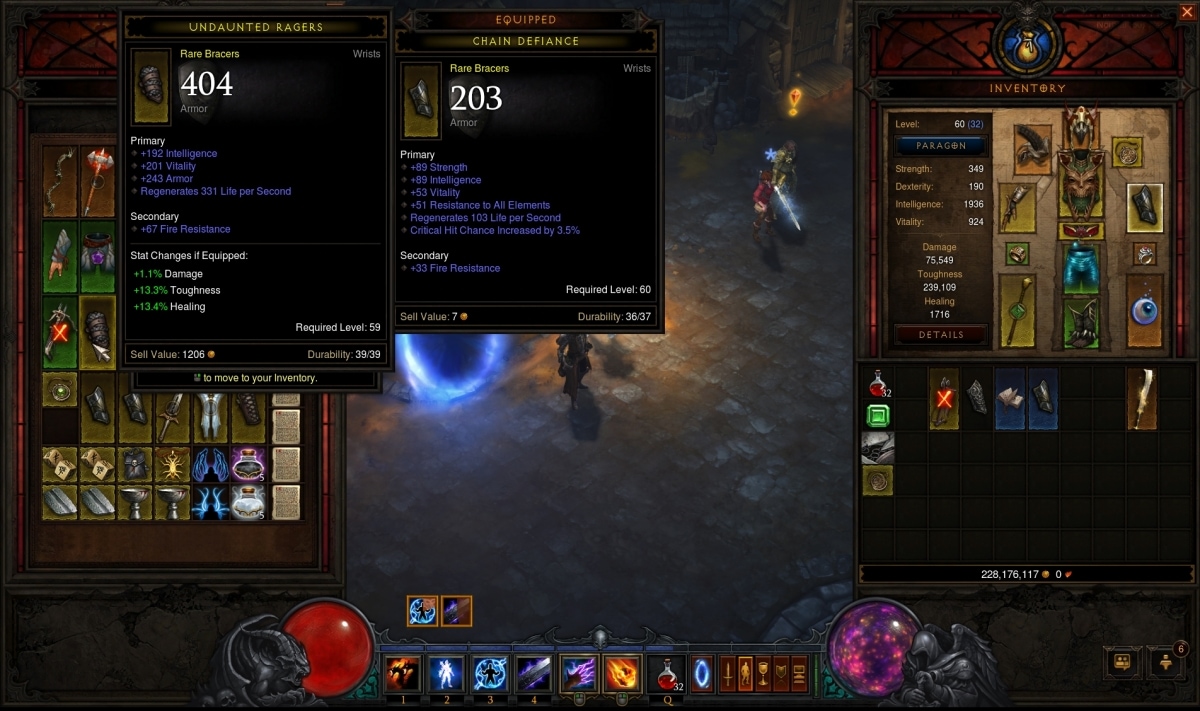
In addition, many items in the world have undergone significant revision, and additional powerful Legendary items will be available to the most dedicated of collectors. Best arm yourselves wisely, lest the quality of your blade be found lacking.
You Know What They Say About Curiosity...
- Cursed Events -
Across the land, there have been sightings of great treasure troves and boons succumbing to demonic taint. Inspecting such cursed items may present the most curious of adventurers with too overwhelming a challenge to survive. Still, those that somehow prove successful, and in the ever unlikely event surpass expectations, may find themselves exceptionally rewarded.
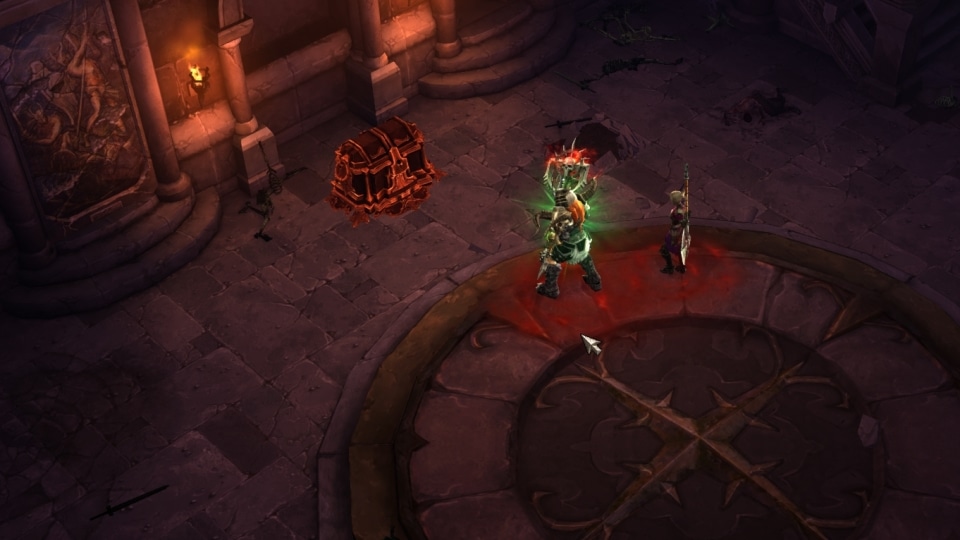
Should you encounter one of these sullied Chests or Shrines, do not claim I did not warn you – be it endless waves of enemies or a single, extraordinarily powerful foe, I will be happy to stand ready and collect your soul when they finish you off.
Nephalem Are Supposedly Powerful... So Prove It!
- Powering Up with Paragon 2.0 -
While I am loathe to think of you insignificant half-breeds as more than a careless mistake of that traitor Inarius, it would be unwise to dismiss the legends as a whole. It is said that the nephalem have the ability to reach great potential due to their mixed heritage, and the most accomplished exhibit this prowess by reaching the upper limits of Paragon levels. Some of you may have previously reached a limit to this power, but with the upcoming challenges on the horizon, it is time to stretch beyond those limits.
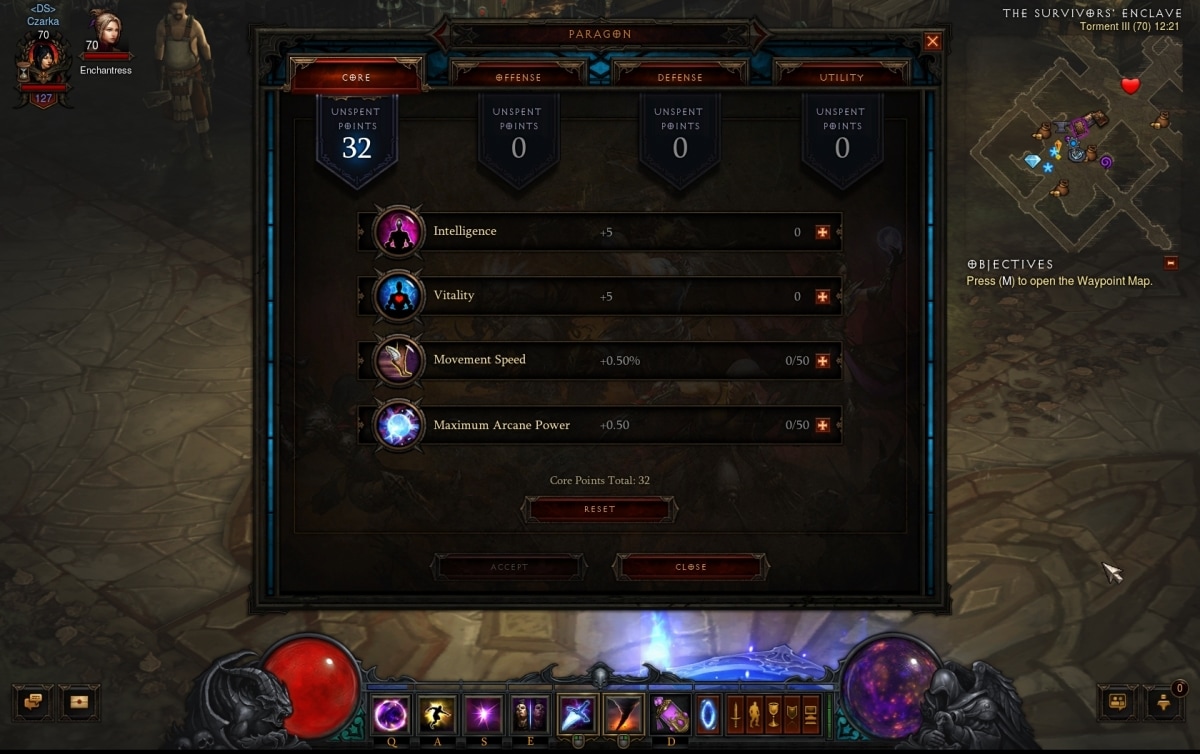
A scholar by the name of Wuluxar has gathered some extensively detailed tomes on this topic, and you can read more about his discoveries here. After all, it is in your best interests.
Power Overwhelming
- Class Updates -
If it has been some time since you last visited Sanctuary, you may find yourselves on unfamiliar ground. Each class of nephalem has been revisited and significantly revised, offering more powerful, refined combat techniques in greater variety than ever before. Previous comfortable tactics may no longer be at your beck and call, but I encourage you to explore each new ability and bring new, surprising builds to the battlefields in Westmarch.
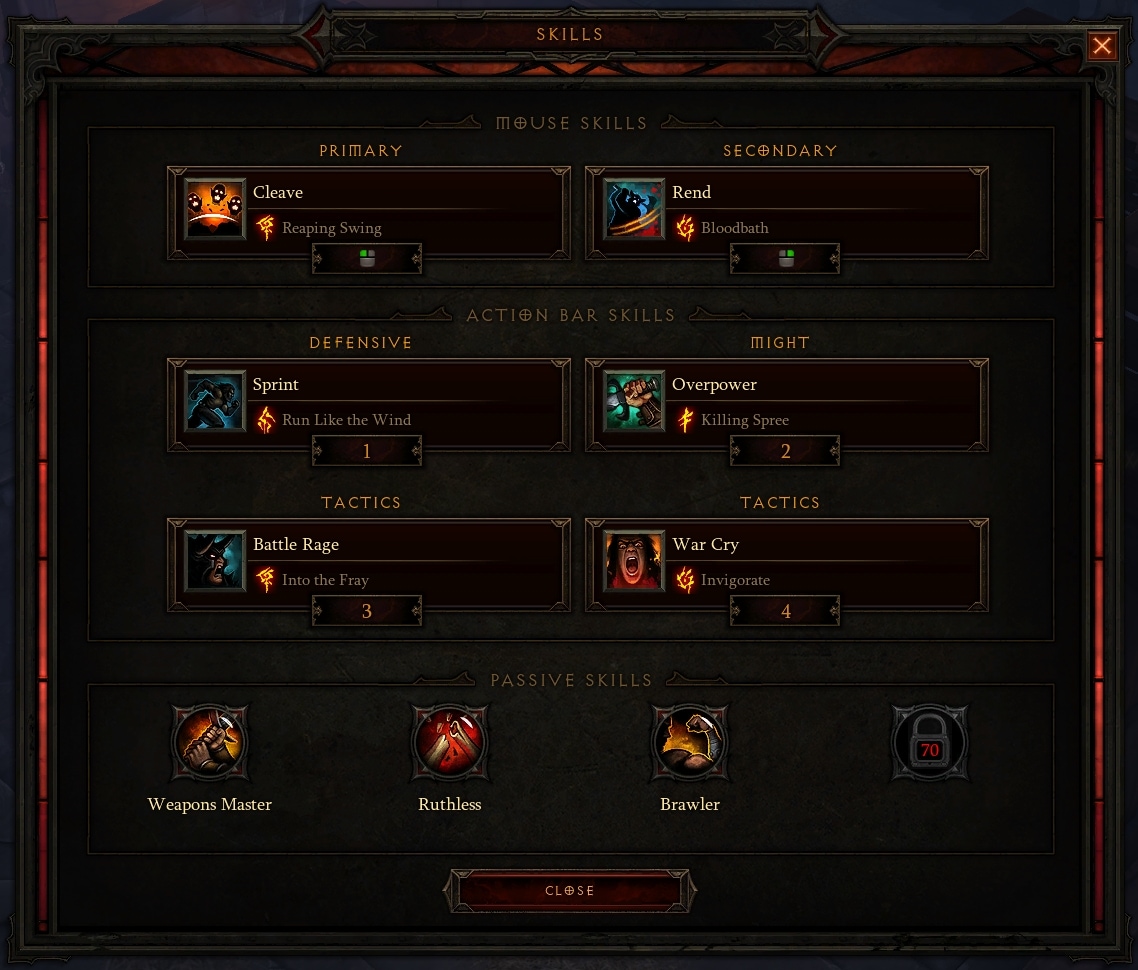
You have some time between this week's patch and the arrival of my lord. I strongly advise you utilize it efficiently.
So Many Recipes, So Little Time
- Crafting Updates -
That insufferable Jeweler and stubborn Blacksmith may not be as daft as I initially perceived. It seems they have been busy while you have been gallivanting across the countryside, and they are now equipped to offer more refined goods (at a price, of course). Legendary materials are scattered across the land and can now be used to forge powerful weapons and armor, which may fill in gaps as necessary should luck not be in your favor.
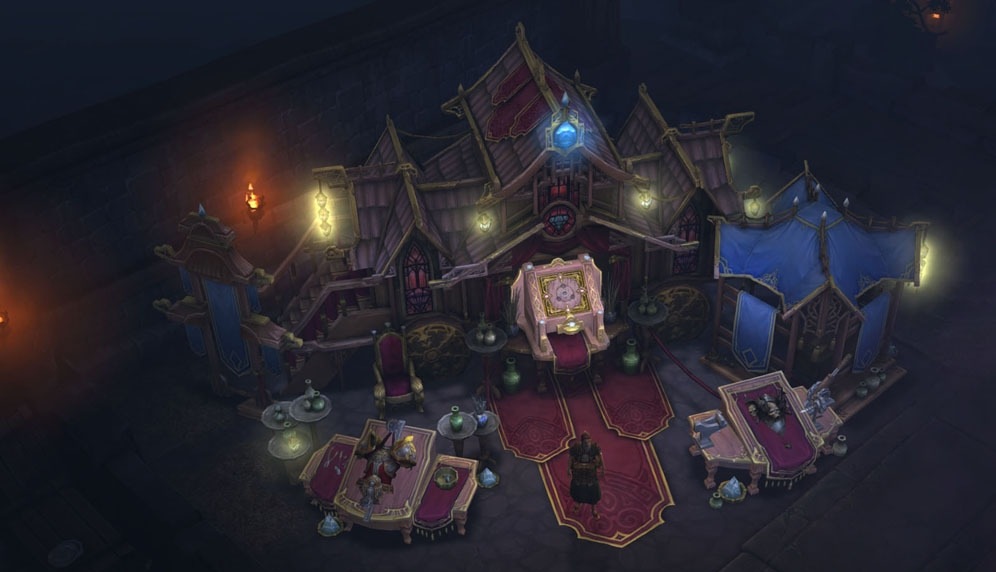
Of course, with all the changes to treasure and encounters across the land, costs have also been adjusted. Manage your resources carefully, and you just might walk away with the favorable deal.
A Little Challenge Never Hurt Anyone
- New Difficulty Settings -
Of course, if you plan to stand a chance against the inevitable eradication of your pathetic human race, training should be your first priority. Another gift to you, my overconfident little nephalem, is the complete revision of the Difficulty system, offering a much more streamlined progression path for the hero in training. Beginners can start their journey in Normal difficulty and climb their way through Hard, Expert, Master, and Torment. The highest difficulties offer the best rewards, and you can challenge yourself further by advancing from Torment I through Torment VI.
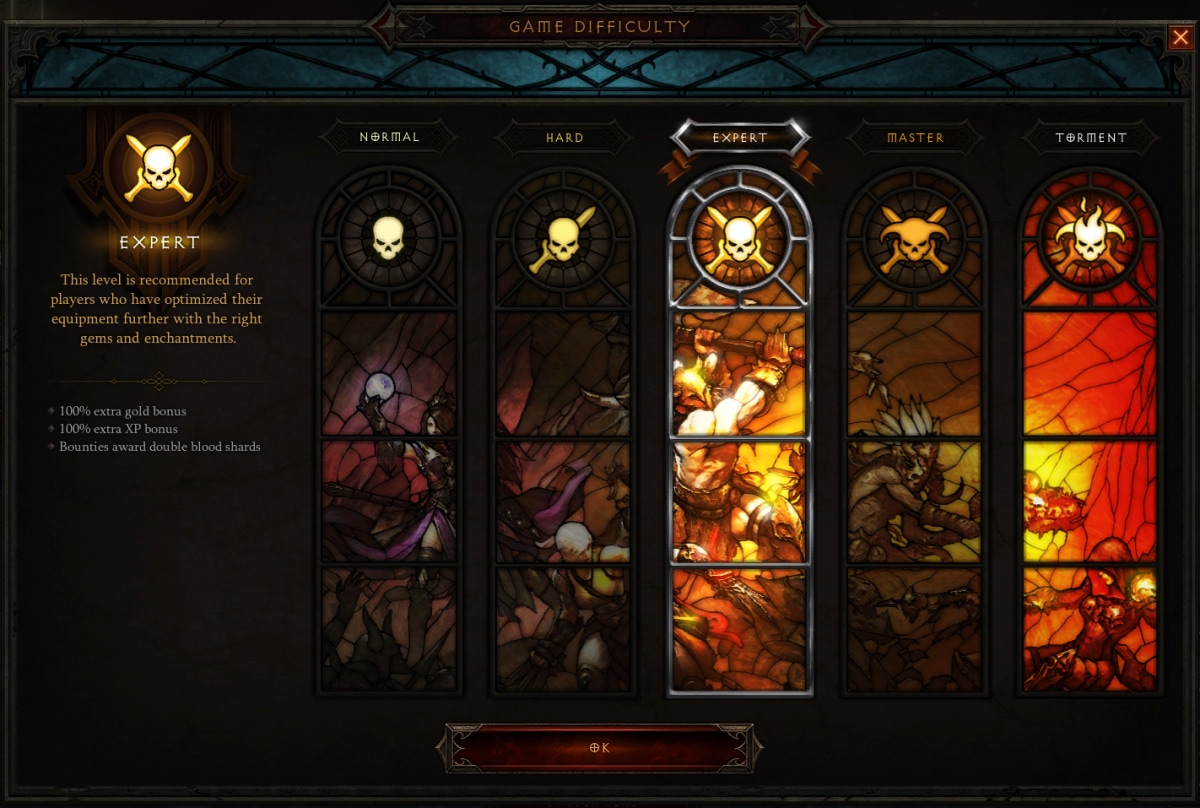
One need not worry about facing too small a challenge – foes now scale with players, eliminating the need to advance through particular difficulties and Acts during your leveling experience. Only the finest, most powerful heroes could stand a chance against the Angel of Death, so do be certain to start your journey as soon as possible.
Survival Instincts - Rewarding Self-Preservation
- Pools of Reflection -
It should go without saying that your goal should remain, well, to stay alive. If your sense of self-preservation was not previously a priority, should you gaze into a Pool of Reflection, it might encourage you to be a tad less… risky in combat. Collecting the waters of a Pool of Reflection grants a boon to the user, boosting the amount of experience earned for some time. Additional Pool of Reflections can be collected to increase the scope of this benefit.
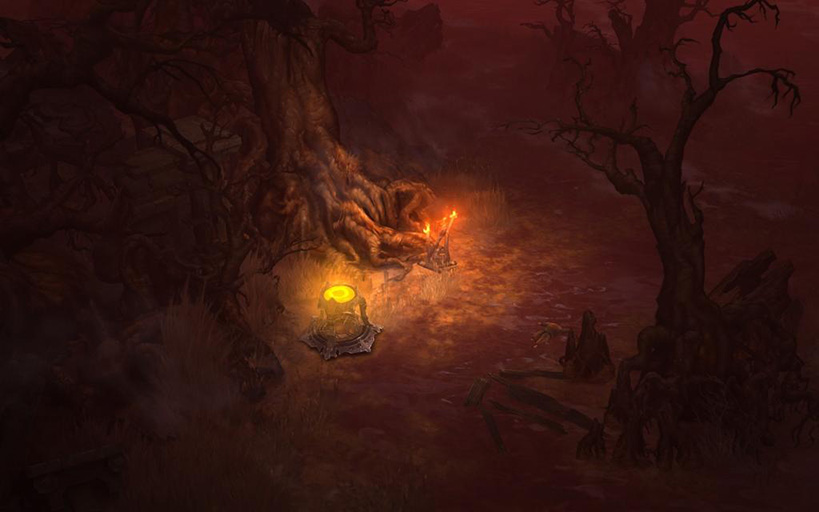
However, should you fail in caring for your fragile bodies and enter my realm, all existing stacks of this favor will be lost. I also cannot guarantee the return of your soul – I have a proclivity for keeping such things close…
New Tricks for Everyone... Including Your Foes
- Monster and Boss Updates -
Do not expect it all to be a walk in the courtyards. You are not the only ones expanding your repertoire. The most powerful adversaries across creation might surprise you with new abilities, such as summoning a Thunderstorm over your tiny, oblivious heads or spreading a torrent of caustic Enchanted Poison across the battlefield beneath your clumsy feet.
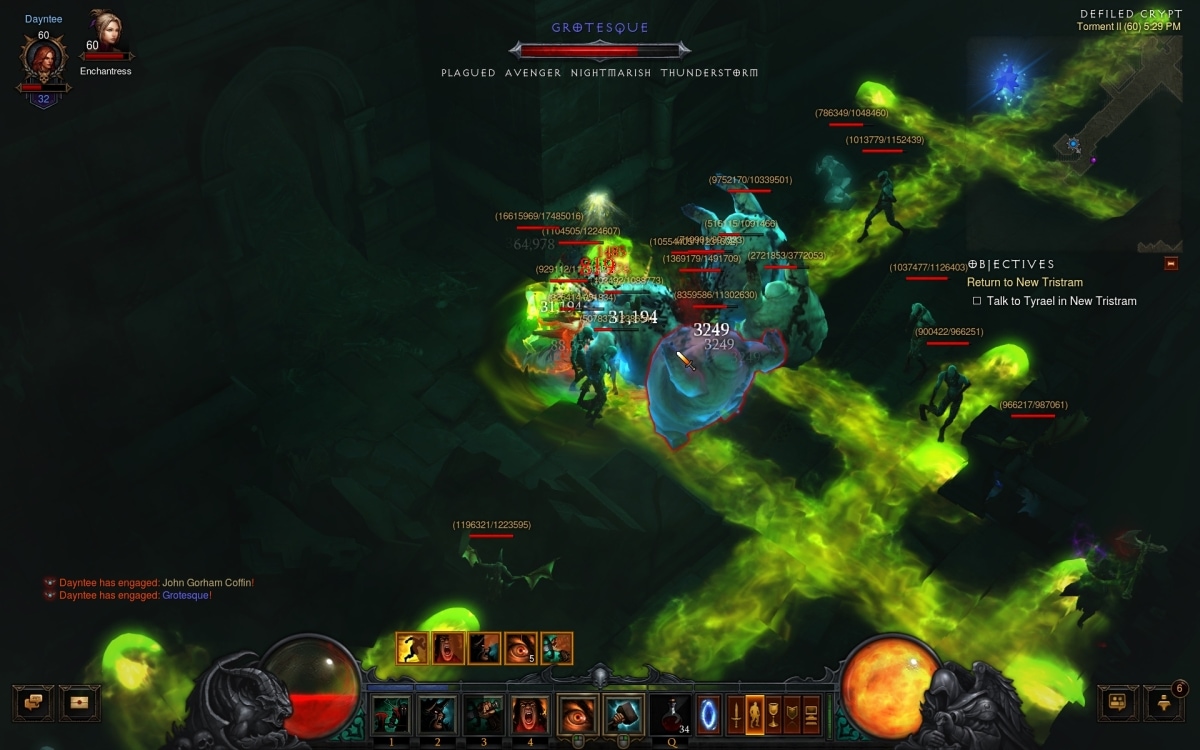
However, minions are not the only ones with new tactics. Some of your older, more challenging foes have revised their battlefields and abilities. Be wary of these new surprises; I would hate for you to perish before our fated meeting.
Band Together - You'll Need the Help
- Clans & Communities -
Greater numbers are not always the solution to one's problems, but in your case, they certainly could not hurt. Clans and Communities offer a variety of tools to organize your fellow champions, band together to take on greater challenges, or simply communicate your inevitable failures.
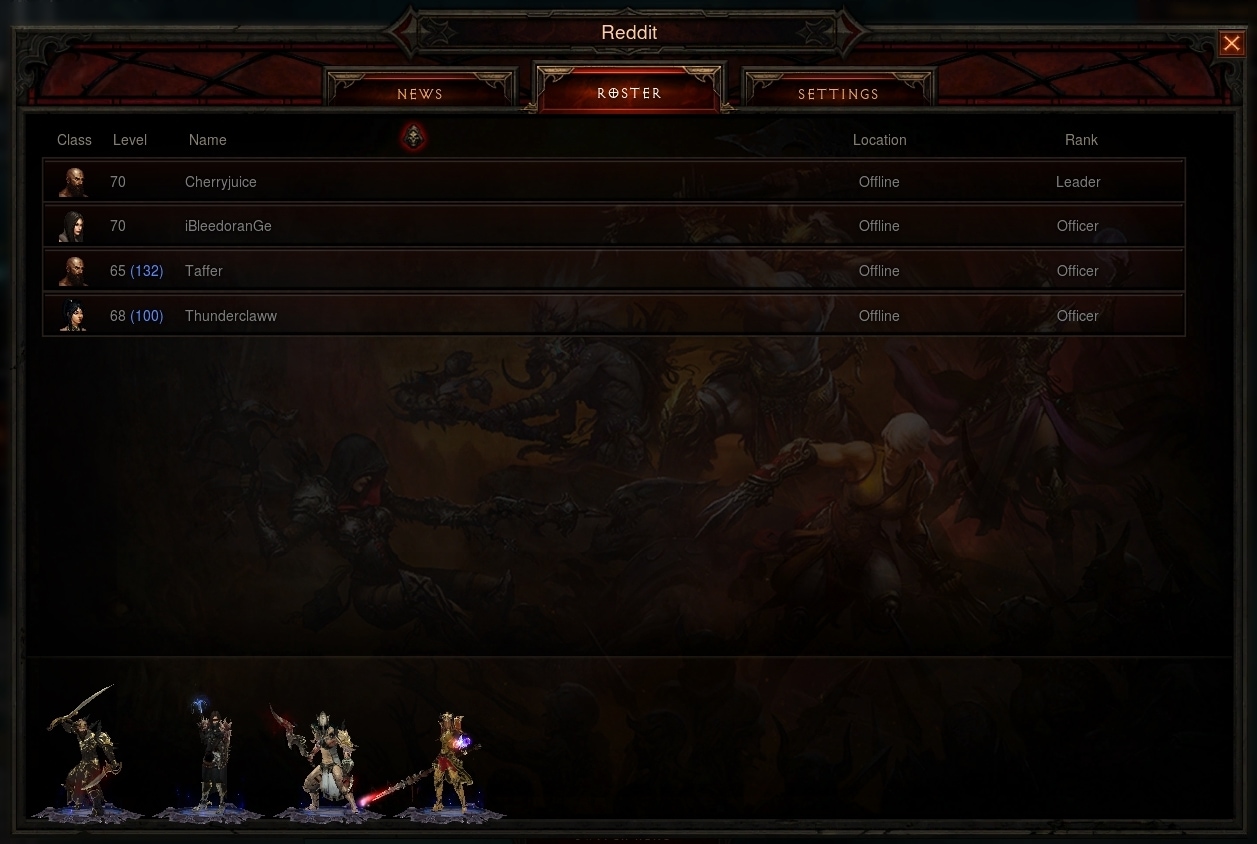
That wretched Crusader Vaneras has already gone into great detail about these upcoming features, so I will avoid getting too long-winded on this topic. Suffice it to say you are going to need every last ally at your disposal to dare challenge my Death Maiden sisters, let alone Malthael himself.
We'll Be Waiting...
- The Reapers are Calling -
I have done my utmost to prepare you, warriors of Sanctuary, for the battle against my sisters, brethren, and Death incarnate. Should you find my offerings insufficient, you can review a more comprehensive list of patch notes here. Of course, I can understand how daunting the pressure might be. It's alright – you always have the option to surrender now.
Let me know in the comments below – do you foolishly believe you are worthy to take Malthael on head to head? Or would you rather lay down your Legendary arms as you wilt at my grasp? I will cleanse your demon blood, Nephalem. Do not disappoint me when we meet in battle.
Blizzard Quote [source]
Embrace the ever-changing world of Sanctuary. The Diablo III game guide has just been updated with information on the pre-expansion 2.0.1 patch. This update applies to the PC version of Diablo III and will be downloadable as soon as you open the game launcher or Battle.net desktop app.






Class pages, skill calculators, and our Items database have been updated with the game informaiton, as well.
We're always looking for ways to expand and improve the guide with answers to all of your questions. If there are any particular aspects of the game you're curious about, let us know in the comments!
Blizzard Quote [source]
Diablo III patch 2.0.1 is currently available for download in the Americas. Check out the full patch notes below to learn all about the latest changes.
Important: Please note that you will not be prompted to download patch 2.0.1 until the patch is live in your home region. If you are logging in from a European or Asian client, you will need to wait for this patch to release in that region before it can be installed. Additionally, if your home region is in the Americas, you will be unable to log into Europe or Asia using Global Play after patch 2.0.1 is live until those regions have also patched.

Diablo III Patch 2.0.1 - v.2.0.1.22044
The latest client patch notes can be found here.
Visit our Bug Report forum for a list of known issues.
Table of Contents
- General
- Bosses
- Classes
- Crafting and Artisans
- Difficulty
- Events
- Itemization
- Monsters
- Paragon
- Social Features
- User Interface
 GENERAL
- Pools of Reflection have been added to the game
- Pools of Reflection provide a 25% bonus to experience
- This bonus persists until you reach a set amount of bonus experience (equal to approximately 10% of the current amount of Paragon experience needed to reach the next Paragon level) or your character dies
- Gathering additional Pools of Reflection bonuses increases the amount of total experience bonus a character can receive until character death, stacking up to 10 times
- This experience bonus persists on logout
- Nephalem Glory has been added to the game
- Occasionally during battle, monsters will drop Power Globes when damaged or killed
- Power Globes grant the Nephalem Glory buff, which causes players to deal additional damage in the form of golden lightning bolts and increases their movement speed for a short time
- This buff can stack up to three times
- New hero stats have been added to the game
- These include Toughness, Healing, Splash Damage, Cooldown Reduction, and Resource Cost Reduction
- Life Steal has been redesigned and is now less effective at higher character levels
- At level 60, Life Steal is reduced to 10% effectiveness
- Players now have the ability to resurrect in multiple places when they die in Normal (non-Hardcore) games
- You may choose to either resurrect at your body, in town, or at the last checkpoint you encountered
- Players may not resurrect at their body during a Boss encounter
- Players may only resurrect at their body a maximum of three times in a row
- Player hit boxes have been adjusted to more closely represent character models
- Both male and female models of the same class share the same size hit box
- Followers now automatically level with characters
- Quests now occasionally grant item rewards when completed during the leveling process
- Gold can no longer be traded
- Graphics engine has been updated to support reflections
- Reflections can be turned on in the Options > Video menu
- Note: This setting is not recommended for players running minimum system specifications
BOSSES
- Many bosses have had their mechanics revisted and retuned
- The following bosses have received the largest changes to their encounters:
- Maghda
- Siegebreaker
- Azmodan
- Iskatu
- In addition, the enrage timers for the following Bosses will only be enabled in Torment I and above:
- The Butcher
- Zoltun Kulle
- Belial
- Ghom
- Siegebreaker
- Rakanoth
- The following bosses have received the largest changes to their encounters:
CLASSES
- All classes have undergone significant revision. Additional details and patch notes will be available in the near future. In the meantime, we encourage you to log in and explore the new changes for yourself!
CRAFTING AND ARTISANS
- Crafting has received several quality of life changes
- Crafting materials have been condensed into two item level tiers: 1-60 and 60-70
- This change is to reduce the amount of stash space consumed by crafting materials and simply older crafting recipes
- All crafting materials currently in character inventories and stash have been converted accordingly
- All crafted items will now roll with stats appropriate to the character crafting them, using the Loot 2.0 Smart Drop system
- Please note that items designed to roll specific stats, such as the Archon Armor patterns, are exempt from this system
- Items purchased from vendors are now flagged as such, and cannot be salvaged
- Crafting materials have been condensed into two item level tiers: 1-60 and 60-70
DIFFICULTY
- The difficulty system has been completely revised
- Nightmare, Hell, and Inferno modes have been removed
- Difficulty is now dynamic and monsters will level up with your characters
- There are now five difficulty settings to choose from: Normal, Hard, Expert, Master, and Torment (1-6)
- Normal, Hard, and Expert are immediately available
- Master unlocks upon completing Act IV
- Torment unlocks upon reaching level 60
- Torment level also includes a difficulty slider, offering an additional six adjustments with increasing rewards and more powerful monsters
- Each level offers new bonuses and rewards, visible in the difficulty selection menu
- You can now lower your difficulty setting in-game
- However, increasing your difficulty still requires exiting your current game
- This option is disabled in Hardcore mode
- To account for these changes, monster density has been adjusted across all Acts
EVENTS
- Cursed Objects
- Chests and Shrines around Sanctuary now have a chance to be cursed, starting an event once they are inspected
- Like other events, completing a Cursed Chest or Shrine provides a small gold and experience reward, as well as either a Radiant Chest or a random Shrine buff
- These events offer a variety of challenges, including endless monster waves, timed events, and potentially spawning bosses out in the open world
- Infernal Machines
- Torment level difficulty is now required to use Infernal Machines
ITEMIZATION (LOOT 2.0)
- Itemization has undergone a major overhaul:
- Legendary and Set items are now Bind on Account
- Players in multiplayer games may trade Legendaries and Set Items they find with others who were present for the drop for up to 2 hours after the item is acquired
- The Smart Drop system has been implemented
- All items that drop have a chance to roll as "Smart Loot"
- Smart Loot items roll intelligently based on the character being played (example: A Wizard is more likely to find items with Intelligence or bonuses to Wizard skills than a Barbarian)
- Class specific items will no longer roll stats inappropriate to their class (example: Intelligence will no longer appear on Mighty Weapons or Belts)
- New item affixes have been added to the game
- This include Splash Damage, Cooldown Reduction, Resource Cost Reduction, +% damage to Physical damage skills, and specific Class Skill Bonuses
- Item properties have been separated into two categories: Primary and Secondary
- Primary Stats include: Strength, Dexterity, Intelligence, Vitality, Critical Hit Damage, Critical Hit Chance, Attack Speed, Life per Second, Armor, +% Life, Bonus Damage to Elites, Bleed Damage, All Resistance, Sockets, and all new affixes listed above
- Secondary Stats include: Gold Find, Thorns, Bonus Experience per Monster Kill, Chance for (Fear, Stun, Blind, Freeze, Chill, Slow, Immobilize and Knockback), Ignore Durability Loss, Bonus Healing to Health Globes and Potions, Bonus Pickup Radius, Single Resist, Life After Kill, and Level Requirement Reduction
- This is to prevent stats that directly and indirectly increase character power from competing with one another
- Stat ranges on items have been narrowed significantly (example: instead of an item having a stat range of 1-200 Strength, its range might now be something like 140-200)
- Legendary powers now roll in a range, instead of a static amount
- Example: The Legendary Spirit Stone “The Laws of Seph” has the legendary affix “Using Blinding Flash restores [75-100] spirit”
- Players can now view the stat ranges of items by pressing and holding CTRL while an item's tooltip is open
- All Legendary items have been reworked with one or all of the above points in mind
- Potions have been condensed to a single type; they now provide 60% of your total health when consumed
- All Potions currently in character inventories or stashes will be converted to the new Potion type
- Legendary and Set items are now Bind on Account
MONSTERS
- Monster affixes have been revisited and retuned
- Arcane Enchanted
- Spawn effect now shows which direction it will start rotating
- Desecrator
- Damage now begins low, but quickly ramps up to its maximum damage
- Frozen
- Increased the number of Frozen crystals spawned by monsters with this affix
- Frozen no longer increases how many crystals are spawned based on the number of players in the game
- Frozen crystals now deal area of effect damage over time to players as they build up to their explosion
- Jailer
- Now does a small amount of damage when applied to the player
- Vortex
- Now does a small amount of damage when applied to the player
- Mortar
- Now has an outer impact area that does less damage than the center of impact
- Now detonates if they vertically hit a wall
- Plagued
- Monsters with this affix now sometimes drop a pool under players as well as under themselves
- Reflects Damage
- No longer reflects a portion of incoming damage
- Now reflects a fixed amount of damage per attack
- Elite and Champion monsters now have five new possible affixes
- Frozen Pulse: A shard of ice follows targets around before freezing in place and pulsing cold damage in a small area
- Orbiter: A nexus of electrical energy appears, surrounded by additional balls of lightning that orbit in a large area
- Poison Enchanted: Summons globules of poison matter that spread in a cross pattern, dealing damage to those caught in their wake
- Thunderstorm: A powerful bolt of lightning strikes the ground, emanating a small wave of electrical energy
- Wormhole: A pair of portals appears, dealing damage as it tears unfortunate targets from their location and transports them elsewhere
- Arcane Enchanted
- Monster density has been revisited
- Density has been retuned around the new difficulty system
- Elite and Champion packs can now spawn in a larger variation of pack sizes
- Wasp projectiles can now be dodged and blocked
PARAGON (PARAGON 2.0)
- The Paragon leveling system has been completely revamped
- There is no longer a cap on the number of Paragon levels a player can gain
- Paragon levels are now account-wide and shared across all characters
- Note that Paragon levels are tracked independently between Hardcore and Normal modes
- Players no longer gain static bonuses upon achieving Paragon Levels and bonuses currently earned by players have been removed
- Players now earn Paragon points each level to spend in one of four separate categories: Core, Offense, Defense, and Utility
- Players with existing Paragon levels have been granted the appropriate number of points to distribute amongst these categories
- With these changes in mind, the Paragon leveling curve has been updated
- Note that all Paragon experience earned across all characters prior to this patch has been totaled and recalculated into your new account-wide Paragon level
- Paragon points can be allocated by clicking the Paragon button in the Character Paper Doll and Inventory screen (Default Hotkey C)
SOCIAL FEATURES
- Clans and Communities have been added to the game
- Clans
- Anyone may create a Clan, and doing so gives access to the Clan window (default hotkey N)
- Joining or creating a clan displays your clan tag next to your name
- Clan members can view the Members Roster, a private chat channel, and a News & Info tab for Clan affairs and information in the Clan window
- Clans support up to 120 members and require an invitation to join
- Players may only be a member of one Clan at a time
- Communities
- Anyone may create a Community, and can view their Community details in the Social tab (default hotkey SHIFT + O)
- Community members have access to their Members Roster, a dedicated chat channel, and a News & Info tab for sharing stories and Community information
- Players may join any number of Communities they wish
- Communities do not have a membership limit; however, if the number of members exceeds 100, only Officers and above will be displayed in the Members Roster
- Communities can be designated as Private or Public; Private Communities require invitation to join
- Communities are organized by categories, including but not limited to Classes, Regional, and Game Type
- Clans
USER INTERFACE
- Several quality of life changes have been applied to the User Interface
- The Difficulty and Game Creation menus have been completely redone
- The in-game Menu has been revised
- The waypoint list has been replaced with a waypoint map
- Skill tooltips now show damage type if Advanced Tooltips are enabled
- Several new social options have been added to support Clans and Communities
- These can be accessed in the Options > Gameplay menu
- New chat colors associated with Clans and Communities have been added
- There is now an option to enable icons for dropped items instead of text
- This can be enabled in the Options > Gameplay menu
- There is now an option to automatically skip all cut scenes
- This can be enabled in the Options > Gameplay menu
- Item labels for Gold piles are no longer displayed
- This is to reduce visual clutter; values are still displayed when gold is picked up
If you are experiencing technical issues with the patching process, connecting to Battle.net after installing the patch, or errors while playing a newly-patched game, please visit our support site or post in the Technical Support forum for assistance.
Blizzard Quote [source]
Behold! Two epic new bonus items have just been spotted in the mortal realms, both of which will be granted in the future to anyone who pre-purchases the Reaper of Souls™ expansion digitally on Battle.net, or anyone who redeems a Reaper of Souls retail game key on or before March 31, 2014.
Check them out below:
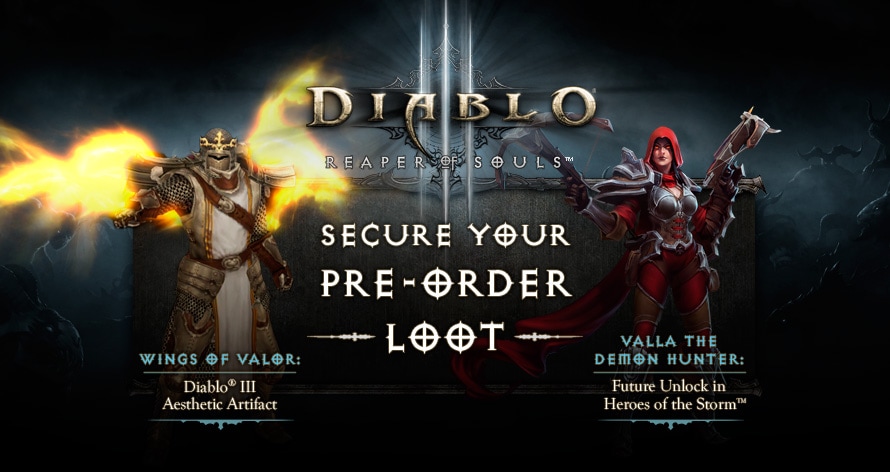
Wings of Valor: Summon the radiant wings of the Archangel of Valor for your characters in Diablo III.
Valla the Demon Hunter: Unlock Valla the Demon Hunter in Heroes of the Storm—our upcoming free-to-play online team brawler featuring iconic Blizzard characters, fast-paced combat, and epic battlegrounds.
If you've already digitally pre-purchased the Reaper of Souls expansion, either as the standard edition or the Digital Deluxe Edition, then you're all set! These bonus items will be granted to your Battle.net account as follows:
- The Wings of Valor will be automatically sent to your existing and any newly created Diablo III characters via an in-game notification starting March 20, 2014.
- Valla the Demon Hunter will be available once Heroes of the Storm has been officially released. Note that Heroes of the Storm is still deep in development and does not have an announced release date, but you can stay tuned to the official game site for future updates. Note also that pre-purchasing Reaper of Souls does not guarantee a spot in the eventual Heroes of the Storm alpha or beta tests.
If you pre-order Reaper of Souls at a retail store—either a physical standard edition or physical Collector's Edition—be sure to redeem your Reaper of Souls game key via your Battle.net account on or before 11:59 PM PST on March 31, 2014. If you redeem your game key after that date, your pre-order loot will be consumed by the fires of the Burning Hells and lost forever. While you have six days from the time the expansion launches on March 25 to the time you must enter your code, to be safe, you should secure your preorder today and be ready to input your game key on launch day.

For more information on the upcoming March 25 launch of Reaper of Souls, be sure to check out the official expansion website, and keep your demon-weary eyes glued to www.diablo3.com for the latest news on the game.
Until then, slay well, Nephalem.
- The Diablo III Team
Blizzard Quote [source]
In preparation for the launch of patch 2.0.1, the Reaper of Souls™ Beta and Patch 2.0.1 PTR servers will be brought offline this evening at 5:00 p.m. PT. At that time, players will no longer be able to log in to the Beta or PTR client, all Beta and PTR accounts (including character information) will be reset, and both our Beta forums and PTR forums will be marked as read-only.
We'd like to thank everyone who has participated in the Reaper of Souls Beta and Patch 2.0.1 PTR. You've done an amazing job of testing, and we greatly appreciate all of the feedback you provided during this critical phase of development.
We look forward to releasing patch 2.0.1 to public shortly and encourage everyone to stay tuned to this website for exciting news and updates regarding the upcoming launch of Reaper of Souls!